
ConSys Update Procedure - Alternative method
Note:
Most computers include a copy script to copy new ConSys code to all instances on the computer. For these computers, to update all instances, use the update description in Consys Update
Manual updating ConSys instance(s) to the newest available version:
- Stop all ConSys programs
- Stop ConSysloader program or service for the instances to update
- Start Service manager, 'Services' ('Run as administrator' if not logged in with
local administrative permissions)
- Start menu, 'services'
- Stop ConSysLoader service(s):
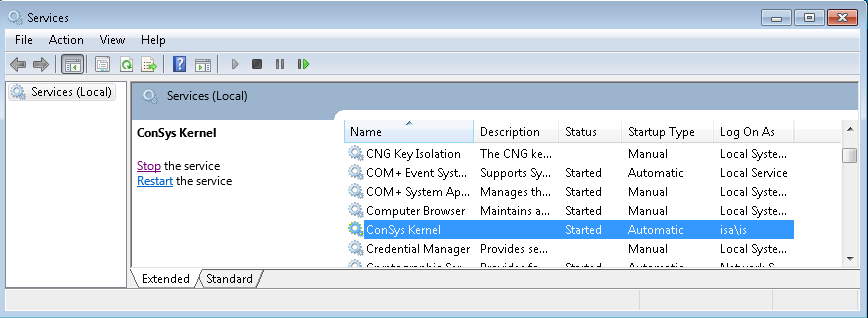
- Wait until the service(s) is stopped. If not stopped within 2 minutes: Kill it from the task manager or reboot computer and start from the top again
- Start Service manager, 'Services' ('Run as administrator' if not logged in with
local administrative permissions)
- Copy the new version of the ConSys executables to this computer
- Source locations on AU
- LatestConSysExecutables: ConSys executables files for x86
- X64_LatestExecutables: ConSys executables files for x64
- LatestCsPlotsExecutables: CsPlot only executables files for x86
- X64_CSAPIExecutables: CsAPI only executables files for x64
Sub directories:
- To local ConSys executables location(s)
- x86: c:\program files (x86)\consys (Instance 0)
- x86: c:\program files (x86)\consys\I1 (Instance 1)
- x86: c:\program files (x86)\consys\I2 (Instance 2)
- x64: c:\program files\consys (Instance 0)
- x64: c:\program files\consys\I1 (Instance 1)
- x64: c:\program files\consys\I2 (Instance 2)
Remarks:
For x86 ConSys installations, copy 'LatestConSysExecutables' to 'c:\program files\consys (x86)' and 'X64_CSAPIExecutables' to 'c:\program files\consys'
For x64 ConSys installations, copy 'X64_LatestExecutables' to 'c:\program files\consys' and 'LatestCsPlotsExecutables' to 'c:\program files (x86)\consys'
Also remember to update other instances on computers with more than one instance of ConSys (I1,I2)
On some computers there is a 'ConSys Setup' folder on the desktop. This folder has shortcuts to 'sevices',ConSys folders - and a command script to copy ConSys files from relavant source locations/destination locations. Before calling the ConSys update command script in this folder, all ConSys application and services must be stopped/closed as descriped above.
Last Modified 26 August 2021